

From MACC to eMACC™: Building the Future Together
December 15, 2025
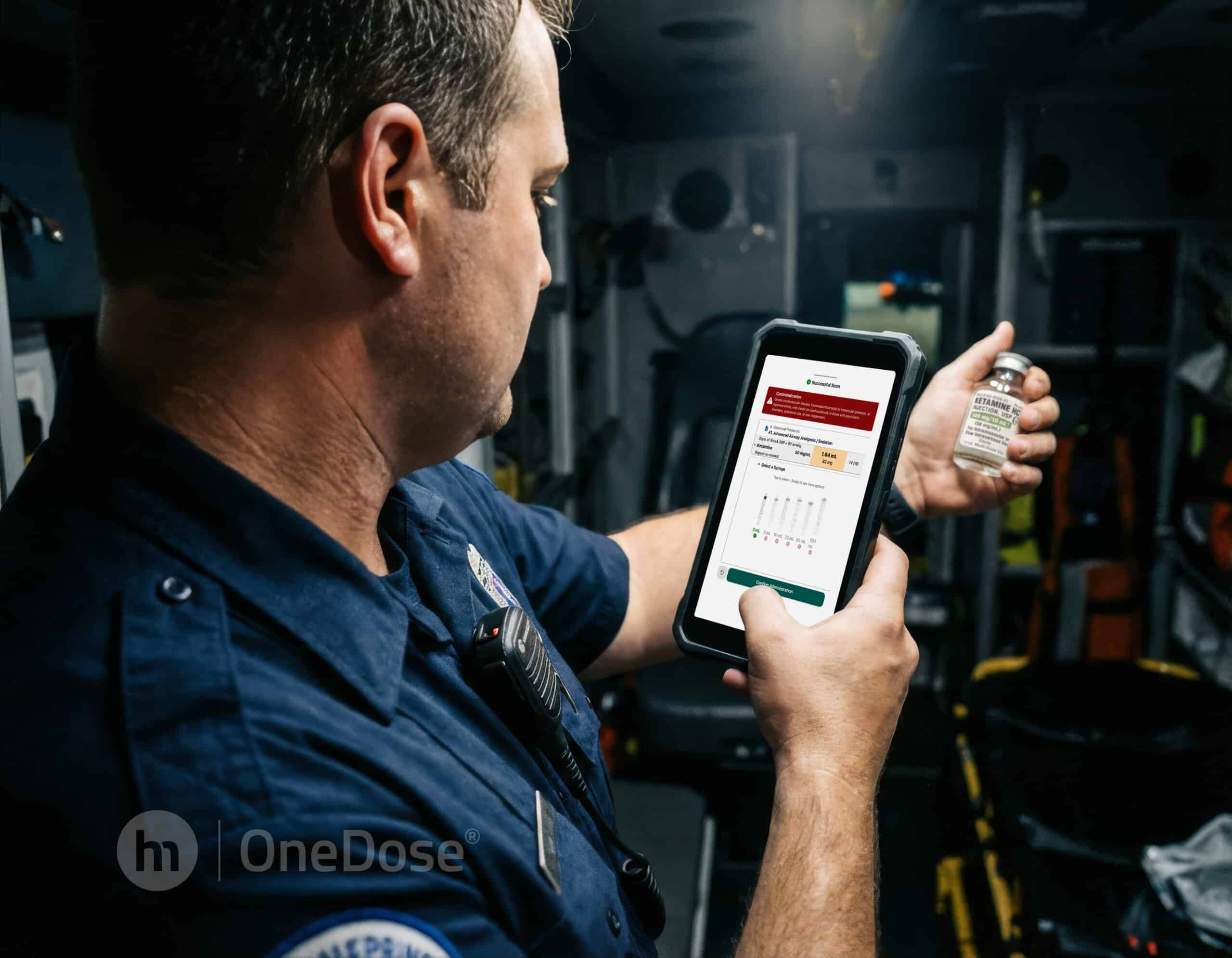
For years, the Medication Administration Cross-Check® (MACC), developed by Dr. Paul Misasi has been one of the most trusted patient safety processes in EMS. It brought structure, teamwork, and intentional verification to medication administration at a time when EMS needed a clear and repeatable system. The MACC didn’t just improve safety; it reshaped culture.
At OneDose®, we have always admired that legacy. That admiration grew into something even more meaningful when we began working directly with Dr. Misasi to enhance the MACC, given new technological capabilities.
Our partnership was built on shared values, including a commitment to patient safety, a passion for supporting providers, and a belief that the best ideas in EMS come from the field itself. The MACC has proven itself over years of real-world use, and we entered this collaboration with deep respect for its purpose and its impact.
Together, we asked an important question:
How can we take the principles of the MACC, remove its limitations, and create true accountability with modern technology?
The answer is eMACC™, the electronic MACC built into OneDose.
The eMACC preserves everything the MACC was designed to accomplish: teamwork, intentionality, and structured verification. But it adds a digital layer that extends its use to every situation and automatically creates an audit trail to support process improvement. By enabling a single provider to scan the medication directly, eMACC verifies medication identity and concentration, links that information to weight-based dosing, and records the entire verification process automatically.
This enhancement is only possible because of the foundation the MACC created, and because of the insight we gained through our ongoing collaboration with its originator. Dr. Misasi’s experience in the field and dedication to safety shaped the MACC; his partnership with us helped shape its natural digital evolution.
Today, agencies using the eMACC aren’t replacing the MACC. They’re enhancing it, supported by the same core principles that made the MACC so effective from the beginning.
We’re proud of the relationship that made this possible, and even more proud to help carry the MACC’s mission forward. Together with its creator, we’re bringing the same commitment to clarity, consistency, and patient safety into the next generation of EMS tools.
To see what we’ve developed, watch the video below.
This is the eMACC: strengthened, supported, and brought into the digital age.
And we’re honored to have built it side by side with the person who started it all.
Missed our January 20, 2026 eMACC webinar? Watch the recording HERE
Video transcripts
OneDose eMACC overview
Hello, everyone. Today we are going to be going through how to use our newest feature called the eMACC stands for electronic medication administration cross check derived by working with the founder and creator of the MACC itself Paul Misasi. It is exactly as a sound medication cross check tool. So two you two ways to utilize this tool. So way one is just by scanning the men by clicking on the eMACC tile. I click on that tile, I find a med, it scans for me.
I use you saw, it scans ketamine, it shows me the strength or concentration, NDC number in every place that it can’t be used. So say I wanted to use this for pain management. I then click into there, you see your contraindication. It tells you what syringe to use, how much to draw up, what it looks like before and after, and it even carries a picture. The second way to go through this process is probably a little bit more consistent with the MACC itself would be driving through the protocols tab up here or the medication.
So if you remember the MACC, medication cross check ready, right? Just by being on the OneDose app, you are ready. I am going to give dose drug name route reason indication. That is all accomplished through driving to my protocol, going into the pain management ones. I’m thinking to myself, I’m going to the pain management one. And I am here. I’m in my pain management protocol. I see my medication, route, everything that’s involved with it. It has a concentration. We’ll get to that in a second.
Contradications would be the next step. But before that, we got to verify it. So I am verifying that I grabbed the right med. That’s in my hand. I scan it and oops, what happened? It’s a concentration mismatch, meaning the concentration that I have in my hand does not equal the one that’s added in the app. If I click use concentration, any ways, it is going to redo that calculation with the medication that I have in my hand, with the concentration that I have in my hand.
Knowing the whole time, the first thing you see on there at the big red is the contraindications, right? So, other contraindications, I tell myself, no, do I have severe cardiovascular disease, so on and so forth, no none of that. What is the volume? I am drawing 2.46 milliliters. Actually, show what that looks like in there, right there, using the small syringe, I am then going to give administer confirmed administration. Is that less that I agree? Give it. Everything as always in the OneDose app is one click documentation.
You have who gave it, when it was gave, how much it was given based off what concentration. We even track the picture that was done on there. We hope you find this feature helpful and we always put our patients first at OneDose.
eMACC training webinar
All right, we’re going to get started. Like I mentioned, we may have someone else joining, but as we all know, you know, things can kind of change in the world of being a paramedic, right? So, but again, want to start off by thanking all of you just for joining today, taking time out of your day to learn a little bit more about OneDose and our new eMACC, which is electronic medication administration cross check. We’re really excited just because it is a first of its kind feature.
And again, you know, thank you for, you know, taking the time to learn more about it. So before we jump into our speakers today want to go over our mission statement here at OneDose which is to advance the first mile of health care by equipping every emergency clinician agency and hospital with intelligent, AI-powered support that improves accuracy, saves time and saves lives. Right? So in a nutshell our goal is to help make your lives easier and we identify technology as a way to do so.
And you know, we’re lucky enough to have connections and be able to identify gaps by listening to real users and, you know, real situations that they’re in that we can help problem solve for. So, our speakers today, we’re going to have Mr. Michael Elsbernd, COO and co-founder of OneDose. He’s going to talk a little bit about, you know, what is the eMACC? Why did we create it? What was kind of the inspiration behind it all? Then we’ve got Chris Johnston, paramedic at Suffield Volunteer Ambulance Association.
He will hopefully, fingers crossed, be joining. We’ll see what happens here. But he’s going to talk. He was one of our beta users. So I thought that was, you know, pretty neat. He’s able to talk about his experience using the eMACC and the workflow that, you know, him and his team have created with it. And then we’ve got Colton Hlett, the brains behind the operation. And the OneDose app itself, Cto and co-founder of OneDose. So, I’m going to let Mike take it away and just kind of go over what is the eMACC.
Thank you guys so much. We’re very excited about today’s webinar. And particularly excited about this feature launch as it is probably the most significant product launch since our inception just over two years ago. We’re really excited about this one because like many features and enhancements that we brought to the market, we identified these in collaboration with our clients and partners. You know, coming to us with challenges they’re facing and being able to work through those with our clients is something that we take a lot of pride in.
And the challenges in this case were preventing wrong med wrong vial errors. And so how can we address that? Once we agreed upon how big of a problem this really solves as a group, we wanted to be the first in the market in EMS to have it. And so we tackled it very fast. We were able to turn this product launch around in really a record time to start just kind of going into why eMACC was created. So on top of that direct client feedback, we identified that many if not all providers are familiar with verbal med cross checks.
And if not that then of course the rights of med dosing typically taught in school and historically the MAC or medication administration cross check was a huge leap forward to help prevent these errors but obviously can come with limitations and some of those limitations are it’s verbal and sometimes reported as inconsistently used. It requires two providers, which can be challenging in any EMS environment, especially if the ambulance is driving down the road. There’s increased risk for human bias, especially during fatigue and stress 2 in the morning.
And then lack of validation and auditability. So with traditional practices, one of the common questions during this discovery phase that we had for our clients was, hey, do you have a verbal cross check in place? And the common answer is we’re supposed to. And so again, that emphasizes that this lack of validation and auditability is something that’s challenging with the verbal cross checks. And so what eMACC, the electronic medication administration cross check solves for is it enables a safe verified cross check with one single provider.
It removes confirmation bias through objective digital verification. So the example to be given there is if I hand you a vial at 2 in the morning and I say, “Hey, this is fentanyl confirm.” You’re very likely at the end of near the end of your shift to say yes. The next thing it also solves is it creates a timestamped auditable record. And you’ll see what that looks like when Colton goes through the demo today. And finally supports accountability without adding a workflow burden.
And so Chris will be going into particular workflow comments at Sufffield and how they were able to work OneDose in and how that resulted. But transitioning over to Chris. Can you first introduce yourself and tell us a little bit about Sfield Volunteer Ambulance Association? I’m muted here. Okay, everyone hear me? Okay. Sorry about that delay. Love Zoom. Yeah. So, my name is Chris. Thanks, Mike, for the introduction. I’m a paramedic and preceptor with Suffield, Volunteer Ambulance. We’re out of Sfield, Connecticut.
We’re a small, rural agency. My day-to-day role here is split between being a provider on the truck as well as a preceptor helping develop other providers as a our training processes focus on supporting new and advancing providers as they build consistent assessment habits, strong decision-m and clean documentation that holds up to both our clinical and QA standards. So we’re a combination department, both volunteer and paid. We ran about 2 2400 calls last year. We have 79 active providers. So again, we’re a little smaller, but you know, this app, we’ve we found that it can really start to scale because our crew configuration and experience levels can vary from shift to shift.
As an agency, we work very hard to create consistency for our care for our you know, our residents, for our town. So whether you’re working with a seasoned partner or someone newer to their role, the expectations and the clinical approach feel predictable and reliable for everyone. Again, my agency spends a lot of time helping providers take on protocols, turn them into real world workflows. You know, and this app has allowed us to put those protocols in front of everybody, right? And being able to avoid tunnel vision, stay organized, when you know, well, some of these calls can create this loud, chaotic environment.
And it helps our providers document appropriately. Any tools, processes we’re we’re always looking for to try to help reduce our cognitive load and standardize our performance here in town because they help you know and OneDose is going to help us u you know create that consistent high quality care no matter who’s on the truck that day. Yeah, thank you. And to provide some added context around the background with OneDose, can you speak to your experience working with OneDose so far since July of 2024 and any collaborative efforts to enhance the solution since then?
Sure. So we started in July 2024. OneDose came out, they installed we do use the OneWeight as well. They came out, installed the scales on the stretchers and they you know trained our staff here. You know, honestly, working with them has been one of the better parts of this whole process. When we first started, I’m I’m always looking for I love technology. So, I had mentioned that I used a CPR app, you know, to these guys, literally the first day meeting them to help that I used to help kind of, you know, gauge my timing, make sure that my gaps between compressions were within 10 seconds.
And you know they literally the next week set up a call, asked me to show them and next thing you know we were beta testing their CPR Assist part of their app. They didn’t just say thanks, move on, right? They asked follow-up questions when we beta tested it. They asked and they took that feedback and they put it into it. Okay. And honestly, everyone knows that in these high acuity calls, you know, I’m going to constantly harp on cognitive offload, but it’s it’s a huge thing in our industry, right?
The less things we have to think about at 2:00 in the morning, the less chance we have to make an error. And, you know, having tools to be able to take that cognitive off that cognitive load and decrease it is extremely helpful. Thank you. And why were you excited about testing eMACC and wanted to help with this particular feature? Well, again, like we you know, the cognitive offload and we strive to have a gold standard of care here in Southfield. You know, not every day does a service, let alone a small service like us, you know, get to take part in having a an impact and beta testing software that could possibly lead to, you know, the prevention of hundreds if not thousands of poor patient outcomes from medication errors.
You know, honestly, lots of things look great in demos, right? And when everybody gets to see this thing, I’ll tell you that I’ve been using this with all of my live patients. You know, my big thing when I was beta testing this thing was, is it going to add to my workflow? Is it going to make more time? Right? That’s one thing we don’t have. You know, how easy is it to use? Does it break? Like my goal was to break this thing.
You know, med medication safety is one of those areas where a small error can mean you’re in the office of medical control. Where is a place we don’t want to be or we’re watching 30 minute long videos of how to draw a medication out of a vial, also a place I don’t want to be. You know, so we were really excited here to be able to standardize you know, that cross check that I’ll be honest, not all of us are great at doing, even though we’re supposed to.
And how do you do that in the back of an ambulance when you’re all by yourself? You know, so being able to beta test this and implement it in our workflows was awesome. And just a couple minutes to the demo, but before that, can you speak to any real life examples of using eMACC in your beta testing? Yeah, I mean it doesn’t add a lot of time. I think that one of the challenges people might initially face or think that it’s going to add a bunch of time to things.
It’s more of a system process here at Southfield, we started ili utilizing an iPad. We’ve moved all of our applications our ePCR software, our ultrasound software, everything on one device. So I mean if you open up your chart, which most people do to put demographics in these calls, it’s literally just go to the next window in your windows, scan your vial, give your med, throw it in the trash. It the camera runs, you hit a button, you just drag the vial in front of it.
As you throw it in the trash, scans it, add to the patient contact. So it’s really that easy. Again, I’m using it on every single patient that I’m touching that I’m giving medications to. To again to try to break this thing. I haven’t been able to break it recently. So I think you guys done a pretty good job with our feedback. Yeah, definitely. And lots of iterations in the testing phase. And final question, if there’s anything additional to add to those workflow changes that this is that OneDose has introduced or challenges or successes that came of that you know, briefly go over that otherwise you know, the next thing I’ll be getting into the demo.
It may or may not be covered here but from an administrative perspective the administrative side of things everything is configurable these you know we’ve adjusted our protocols to match exactly what we do here in Southfield so there’s no more no less we have the ability to put in reference guides in there with hospital codes you know we have the analytics piece which is kind of still in beta that we’re playing with but you know it allows us to see what protocol is being viewed the most which can help our we have a task force here that looks at QAQI data and to kind of gear our education for the year you know it’s going to be even more data for us to kind of look at all the protocols that are being looked at on a regular basis and steer our education towards knowledge gaps as opposed to just the status quo that we do every year.
Fantastic. Well, great transition to hear from a user. And at this point, we’ll get right into it, what everyone came to see, which is the demo. Awesome. Yeah, thank you very much for that, Chris. And just before I show it, I want to reiterate we really took the insight of paramedics when we wanted to build this. We wanted to get as seamless as possible with getting able to scan your medications within one click. So without further ado, I’ll attempt to share my screen.
All right. Can you see my screen? All right. So the first thing that you need to do as always within the one do application is add a patient. When you’re going to call you find out that you’re dealing with a pediatric patient, adult patient. You can do that by entering direct entry. You can use that age formula. If you know that you’re dealing with a 8-year-old, for example, or in this case, I’ll add a 132 kg adult. So, right on the home screen, there’s going to be a new tile, and it’s going to be called eMACC.
So, right away, as soon as you click it opens up the camera. And unfortunately, we don’t have any medication vials with us to scan. So, we do have to just scan images of medications. But how this works is you can do it in two ways. Both ways works on Android and iOS where you can point it at the label and then it’ll pick up that NEC code. And the other way is only effective on iOS, but you can read the barcode as well.
So all you got to do is point it at that medication vial and then it’ll immediately pull up every dose that medication uses for your inside your platform. So if you know that you’re giving it for pain for example, you already have the amount that you need to give B in volume and the actual amount of medication based on the concentration that you scan. So it will change based on the concentration. So if I did scan a different concentration, it would upd up update.
Along with that, at any point if you just want to have that digital trail of scanning that medication, you we have this one and then if we want to scan another one, you can simply point it. So what it did right there is it picked up from that barcode and then it scanned adenosine was the medication. So if I click back into here, the next step of this is making sure you have the right syringe size. So the ideal syringe with a 4 ml medication is a 5 ml syringe.
Although if you did just have a 10 in front of you, it would update as well. Then you can see the next step is the drawing up and the after administration just to notify you that if you draw 10 mls of this medication do not give the whole thing otherwise that is not the correct amount to give. And the last is every medication that’s is scanned in the eMACC process, there’s an image that we document as well. If I press this confirm administration, this will now attach to the patient report.
And if you are on a premium package, that can flow directly into any of your ePCRs. In this example, we’re we have ESO as our ePCR. Now, there’s one other portion of this, which is scanning from a protocol. So if I go into my protocols, click into that pain management protocol again, you can see the medications for that and then the administration actually has the ability to lock a medication if they want it. So you won’t be able to see the amount to give until you verify.
Although stuff happens in EMS, so for whatever reason, we do give you the ability to bypass it. So you can override that. But if I reset this, you can also scan the medication. At this point, there’s three things that can happen. So the first thing that can happen after you verify and it’s an incorrect medication, meaning it’s not the expected one, it’ll let you know right away. So off the bat in this example, we’re expecting to administer ketamine, scan fentanyl. It’s a critical error.
The next portion of this is if you scan a different concentration that can also happen. So I’ll point this at ketamine here and in OneDose we store 50 milligs per milliliter. We scanned 100. So all it does is give you a warning that you have a different concentration and then it will update all that med calculation to the proper concentration. The third and last approach that can happen from the protocol screen is just a successful scan. So you scan the proper medication vial that was expected.
It just outputs that dose right away for you. And as we mentioned earlier, all of this is able to be tracked within the admin console. So I will now jump over to the admin console to show what that looks like. All right. Can you see my screen? Yes. Okay. So now there is going to be a new tile under the advanced items assuming that you’re familiar with our admin console. And it will be called eMACC. As soon as you click into this, we give you the ability to track two things.
So, eMACC scan with every scan that has happened and view NDC pairings is actual NDC code pairings as well. I’ll briefly just click into this one. So, if you have any questions about an NDC code, you can come in here and you can search that up for example and then you can see which NDC code is paired to which medication as well. But now jumping into this eMACC scans. This is the portion that we’re really excited about because this gives you real-time validation about what’s going on across the agency.
You can see all the total scans that you’ve done whole time within your eMACC. You can see how many medications are mapping. And then if I scroll down, you can see which users are actually scanning the medications and which medications are being scanned the most. This gives you some insight within your entire organization. We do have this so if you are an organization-based account you can span over every agency underneath you as well to get more global understandings and there’s other tabs as well.
So if I click into this ketamine one this is the medication that I just scanned earlier under that OneDose account. So you can see the medication that was scanned from the FDA’s database which is where we audit all of our NDC codes and the actual medication within OneDose along with the image. We do give you some other tabs as well. So if you want to group it by medication, you can see ketamine’s been scanned 49 times as well separated by infusion and by user.
So you can see OneDose is the biggest super user here. And that’s the overview of what we have the capability of on the admin side and really the entire process of eMACC that we’re really excited about.